
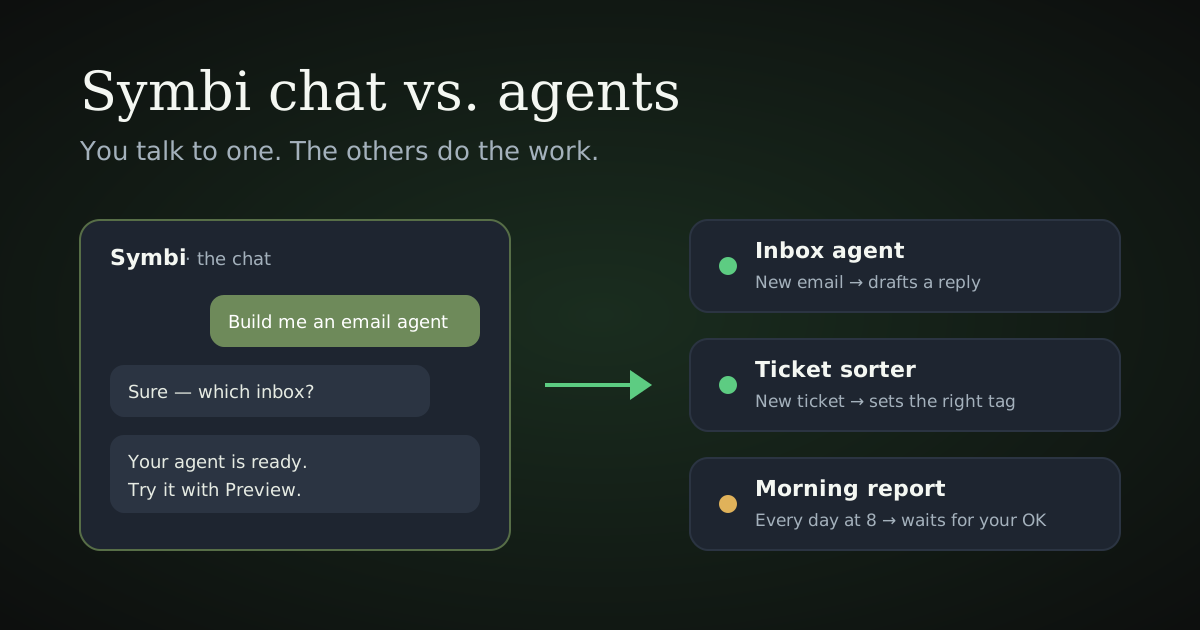
Symbi chat vs. agents — who does what
In Symbi you talk to one assistant, and agents do the work. Here's the difference, and why it matters.
Two different things
Symbi has two parts, and it helps to keep them apart:
- Symbi, the chat — the assistant on the left side of the app. You talk to it.
- Your agents — workers that each do one job, on their own, in the tools you already use. You don't chat with them. They just work.
A good way to think about it: Symbi is the colleague you ask for help. Agents are the team members Symbi helps you set up.
Symbi, the chat: the one you talk to
The chat is where you ask questions and get things done in Symbi:
- "How do I connect Outlook?"
- "Build me an agent that answers emails about delivery times."
- "Why did my agent skip this email?"
Symbi knows the app inside out. It answers questions, sets up agents together with you, and helps you change them later. If you want something from Symbi, the chat is always the place to go.
Agents: the ones that work
An agent has one job and does it by itself. It doesn't wait for you to type something. It starts when its work arrives:
- a new email lands in the inbox,
- a ticket is created in your helpdesk,
- a set time comes round (every morning at 8, say).
Then it does the job — for example reading the email, looking up the order and drafting a reply. You don't talk to an agent while it works. You see what it did.
Where you see your agents' work
- Agents — every agent, what it does and how it's doing.
- Operations — everything that's waiting for a person. You decide, per agent, what it may do on its own and what should wait for your OK. Anything waiting shows up here, where anyone on your team can approve, edit or decline it.
Want to try an agent before it goes live? Open it and use Preview: it shows exactly what the agent would do with your latest emails or tickets, without sending or changing anything.
Why it's built this way
Because a job that has to be done 40 times a day shouldn't need you to ask 40 times. You set an agent up once, by talking to Symbi. After that it just does the work, and you only step in where you've asked to.
In short
Symbi, the chat
- What it is: your assistant in the app
- How it starts: when you type
- What you do: ask, build, change
- Where: the left side of the app
An agent
- What it is: a worker with one job
- How it starts: when its work arrives
- What you do: check its work, approve what waits
- Where: Agents and Operations
Ready to set one up? Read the step-by-step Getting Started guide, or just tell Symbi in the chat what you'd like done.
Questions? Ask Symbi in the chat, or write to contact@symbi.no — a person will answer.
To forskjellige ting
Symbi har to deler, og det hjelper å holde dem fra hverandre:
- Symbi, chatten — assistenten på venstre side av appen. Du snakker med den.
- Agentene dine — arbeidere som hver gjør én jobb, på egen hånd, i verktøyene du allerede bruker. Du chatter ikke med dem. De bare jobber.
En god måte å tenke på det: Symbi er kollegaen du spør om hjelp. Agentene er teammedlemmene Symbi hjelper deg å sette opp.
Symbi, chatten: den du snakker med
I chatten stiller du spørsmål og får ting gjort i Symbi:
- «Hvordan kobler jeg til Outlook?»
- «Lag en agent som svarer på e-poster om leveringstid.»
- «Hvorfor hoppet agenten min over denne e-posten?»
Symbi kan appen ut og inn. Den svarer på spørsmål, setter opp agenter sammen med deg, og hjelper deg å endre dem senere. Vil du ha noe fra Symbi, er chatten alltid stedet å gå.
Agentene: de som jobber
En agent har én jobb og gjør den selv. Den venter ikke på at du skal skrive noe. Den starter når arbeidet kommer:
- en ny e-post lander i innboksen,
- en sak opprettes i kundeservicesystemet ditt,
- et fast tidspunkt kommer (hver morgen klokken 8, for eksempel).
Så gjør den jobben — for eksempel leser e-posten, slår opp bestillingen og skriver et utkast til svar. Du snakker ikke med en agent mens den jobber. Du ser hva den gjorde.
Der du ser agentenes arbeid
- Agents — alle agentene, hva de gjør og hvordan det går.
- Operations — alt som venter på en person. Du bestemmer, per agent, hva den får gjøre på egen hånd og hva som skal vente på ditt OK. Det som venter dukker opp her, der alle i teamet kan godkjenne, redigere eller avvise det.
Vil du prøve en agent før den går live? Åpne den og bruk Preview: den viser nøyaktig hva agenten ville gjort med de siste e-postene eller sakene dine, uten å sende eller endre noe.
Hvorfor det er bygget slik
Fordi en jobb som må gjøres 40 ganger om dagen, ikke bør kreve at du spør 40 ganger. Du setter opp en agent én gang, ved å snakke med Symbi. Etter det gjør den bare jobben, og du trer bare inn der du har bedt om det.
Kort fortalt
Symbi, chatten
- Hva det er: assistenten din i appen
- Når den starter: når du skriver
- Hva du gjør: spør, bygger, endrer
- Hvor: venstre side av appen
En agent
- Hva det er: en arbeider med én jobb
- Når den starter: når arbeidet kommer
- Hva du gjør: sjekker arbeidet, godkjenner det som venter
- Hvor: Agents og Operations
Klar til å sette opp en? Les den trinnvise Kom i gang-guiden, eller bare fortell Symbi i chatten hva du vil ha gjort.
Spørsmål? Spør Symbi i chatten, eller skriv til contact@symbi.no — et menneske svarer.